
How we got this result
- Files checkedWe compare the fingerprint and the content of each file with the malware we and others have found, and look at what is inside it.1 of 1 current fileLast checked on 26 Nov 2026
- AntivirusClamAV and YARA, two antivirus scanners, check each current file and the files inside it, up to our size limits. A person reviews every match.0 of 1 current file
- Passed Nothing harmful foundOur checks look for known signs of harm. They cannot prove that a file is harmless.
About
From its official pages
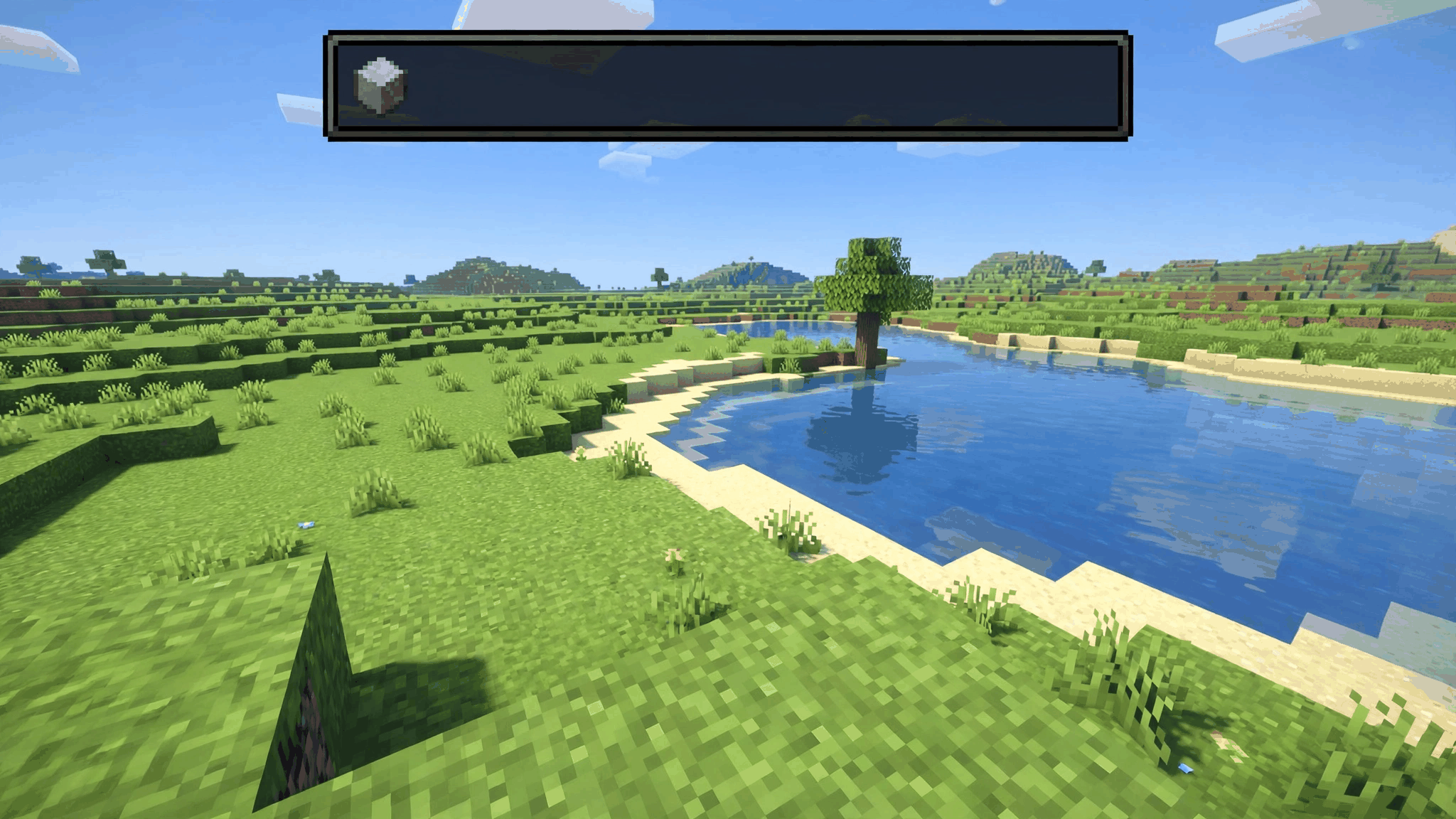
SepWorks WAILA is a Minecraft Bedrock add-on that places a clean display at the top of the screen showing what the player is looking at. When you look at a block or entity, the HUD shows its name, its icon, and useful details about it, so you no longer need to guess which block is in front of you or what an entity is. The display identifies which add-on a block or entity comes from, which helps when several packs are installed together. For blocks it can show the correct tool to use and whether you are currently holding it, along with block states and container contents. For entities it shows health, tags and active effects. The add-on is designed to be lightweight and works in single player, multiplayer and Realms, including survival play. Players can customise what information appears, where the display sits on screen, and when it is shown, using the /waila command, and server operators can adjust another player's settings with /waila followed by a player name.
Written from CurseForge . How we write it
At a glance
- Download
- Files for Bedrock 26.40, 26.50.
- Privacy
- None found.
- Releases
- Latest release on 17 Nov 2026.
- Statistics
- No daily count yet.
Every current file
See each file in ReleasesThe newest release or beta for each Bedrock version, on CurseForge.
Passed
Have a copy of SepWorks WAILA? Check that it is the official one.
Drop it here. We compare its fingerprint with the official SepWorks WAILA files. A file we do not know is not sent: we only say what its manifest declares.
Creators
Who makes SepWorks WAILA, with their most downloaded other projects.
- SepWorksAuthor, 55 projects
 SepWorks RG Shader, Passed
 SepWorks Dynamic Light, Passed
 SepWorks Render Distance Limiter, Passed
 SepWorks FPS Booster, Passed
 SepWorks One Hit Sword, Passed
 SepWorks Chest Order, Not checked
 SepWorks Chain Mining, Passed
 Debug Stick (SepWorks Edition), Passed
 SepWorks Spear Boost, Passed
 SepWorks Night Vision, Passed
 SepWorks Furnace X2 X3, Passed
 SepWorks Simple Waypoint, Passed
 SepWorks Connected Glass, Passed
 SepWorks Grave Keeper, Passed
 SepWorks Touch Circle Hider, Passed
 Sustenance (SepWorks Edition), Passed
 SepWorks Aesthetic Sounds, Passed
 SepWorks Netherite Upgrade, Passed
 SepWorks Potato Optimizer, Passed
 SepWorks Debug Screen, Passed
 SepWorks Flattening Stick, Passed
 SepWorks Ragdoll, Passed
 SepWorks Never Hungry, Passed
 SepWorks Keep Inventory, Passed
 SepWorks Fast Furnace, Passed
 SepWorks Pure Optimizer, Passed
 Halloween Treats, Passed
 SepWorks SneakGrow, Passed
 SepWorks Enchantia, Passed
 Mastery (SepWorks Edition), Passed
 SepWorks Waypoints & Warps, Passed
 SepWorks Simple Farming, Passed
 SepWorks Dark UI Transparent, Passed
 SepWorks Rotten Flesh to Leather, Passed
 SepWorks Vein Miner, Passed
 Buddy Companions, Passed
 SepWorks PvP Crosshair, Passed
 SepWorks Warriors 64x, Passed
 SepWorks Real-Time Sync, Passed
 SepWorks Deep-Mine Navigation, Passed
 SepWorks Random Item Rain, Passed
 SepWorks AutoSmelt, Passed
 SepWorks Health Tracker, Passed
 SepWorks Auto Harvest, Passed
 SepWorks Mob Health Radar, Passed
 SepWorks Video Player, Passed
 SepWorks Little Birds, Passed
 SepWorks Ultimate Block Elevators, Not checked
 SepWorks Ore Amulets, Passed
 SepWorks Troll Traps, Passed
 SepWorks Visual Noteblock Pitch, Passed
 SepWorks Lucky Blocks, Passed
 SepWorks Stone Golem, Passed
 SepWorks Cozy Campfires, Not checked
Source and links
- Pages
- On CurseForge
Something wrong here? Report a mistake
Something wrong here? Report a mistake
Something wrong here? Report a mistake
None found
Its scripts send no web requests. A Bedrock script can only go online with @minecraft/server-net, and its scripts do not use it.
What we checked
We read the manifest and every script of its files, and list the web addresses the scripts write.
- Files checked
- Its current file. See each file in Releases
- Scripts
- In its file.
- Web addresses
- None.
Something wrong here? Report a mistake
Something wrong here? Report a mistake
Something wrong here? Report a mistake
Something wrong here? Report a mistake
Something wrong here? Report a mistake
- Downloads
- 5.7KOn CurseForge
- Created
- 9 Nov 2026
- Latest release
- 17 Nov 2026
- License
- MIT License
Its newest file
What we read in the file: its packs, their manifests and their scripts.
- File
sepworks-waila.1.0.0.mcaddon· 173.3 KB- Kind
- An add-on file (.mcaddon): one or more packs, imported together into the game.
- 2 packs
- Scripts
- 1 JavaScript file, run by the game.
- Script modules
@minecraft/server,@minecraft/server-ui
Something wrong here? Report a mistake