
Bedrock UI+
Bedrock texture pack by Bruhh69
Redesigned menus and on-screen info to make playing easier.
How we got this result
- Files checkedWe compare the fingerprint and the content of each file with the malware we and others have found, and look at what is inside it.1 of 1 current fileLast checked on 25 Nov 2026
- AntivirusClamAV and YARA, two antivirus scanners, check each current file and the files inside it, up to our size limits. A person reviews every match.1 of 1 current fileLast checked on 26 Nov 2026
- Passed Nothing harmful foundOur checks look for known signs of harm. They cannot prove that a file is harmless.
About
From its official pages
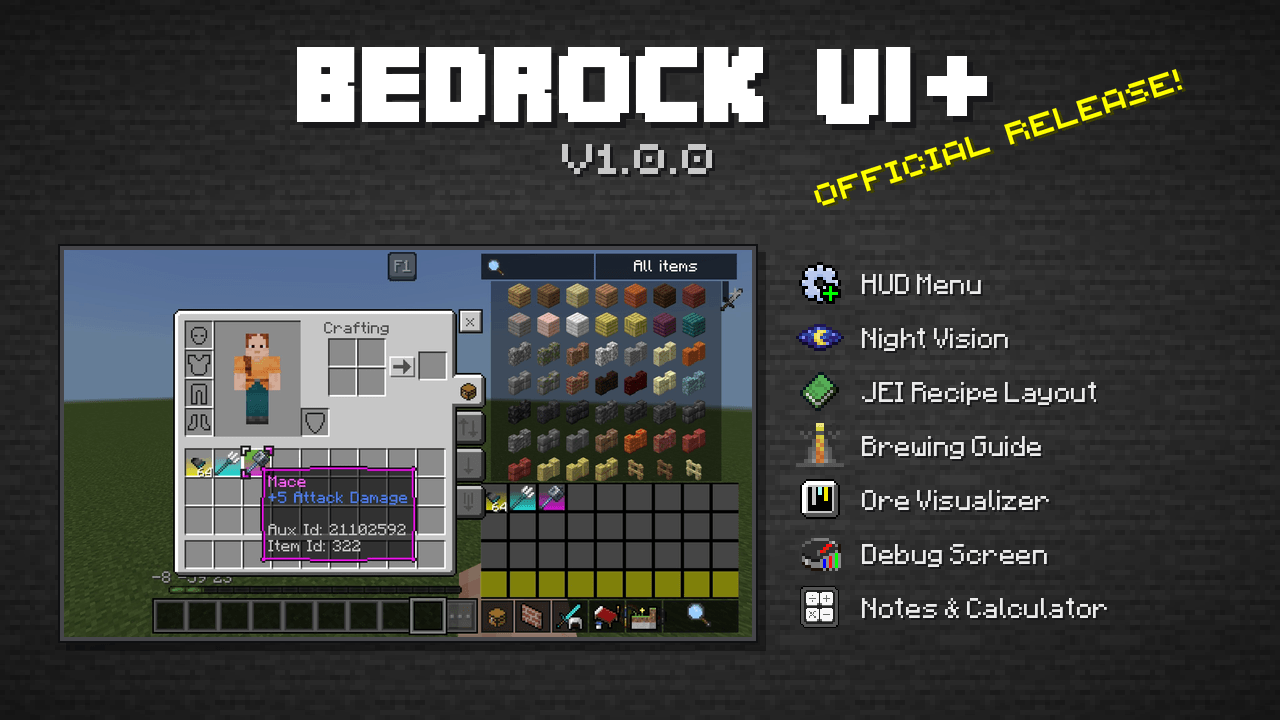
Bedrock UI+ is a user interface overhaul mod for Minecraft Bedrock Edition, derived from the HUD+ project, that reworks many of the game's menus and screens to add quality-of-life features for survival and PvP play. On the start screen, the play button moves to the bottom left with exit beneath it, the dressing room, marketplace, and settings buttons are placed along the bottom, a hide GUI button is added, and a profile section sits in the top left that gathers achievements, invitations, feedback, and account management. The settings screen gets a transparent background along with quick settings for camera and difficulty. In gameplay, the HUD adds a clock and compass in the bottom left, XP percentage and the points needed for the next level beside the XP bar, Java-style XP numbers, coordinates and days played in the hotbar area, clearer item names, a durability viewer, and a low durability warning. The pause screen adds a menu and a debug screen showing FPS, world name, gamemode, Nether and Overworld coordinates, chunk position, and item details, while an inventory HUD displays inventory contents without opening the inventory. Other HUD additions include a hotbar selector that can shift the hotbar left or right, an animated RGB XP bar, a player list HUD, new boss bar textures for the Ender Dragon, Wither, and raids, and a custom crosshair set with eight textures and an RGB option. An ore visualizer shows how many ores are likely to be found at the current Y level and points toward the best mining height with arrows. Custom hotbar and selected hotbar textures offer ten and twenty variants respectively, and a night vision toggle brightens the screen for play in dark areas. The chat screen is made cleaner with a transparent background, a smaller chat history, command autocomplete, and clickable commands, and a temporary note and calculator are available in the menu. Container screens are restyled with colorful textures and a JEI-style layout, quick craft and quick mode buttons, an item rarity viewer, colored item name borders, and colored bundle tooltips that match the bundle color. Furnace and brewing screens show remaining fuel and output percentages, and a brewing guide is included, while chests, shulker boxes, ender chests, barrels, crafting tables, anvils, smithing tables, villager trades, and other workstations receive interface improvements. Extras include item details with light level, hunger and saturation information, enchantment information with tool icons, bundle item counts, and improved item tooltips, with the item details currently supporting English, Spanish, and Indonesian. The pack is configurable through a global variables file that controls whether the JEI layout is used, whether it is transparent, and where item hover text appears, and it is currently supported on Windows and PC.
Written from CurseForge . How we write it
At a glance
- Download
- Files for Bedrock 1.20 to 26.60.
- Privacy
- Nothing sent.
- Releases
- Latest release on 19 Nov 2026.
- Statistics
- No daily count yet.
Every current file
See each file in ReleasesThe newest release or beta for each Bedrock version, on CurseForge.
PassedAntivirus
Have a copy of Bedrock UI+? Check that it is the official one.
Drop it here. We compare its fingerprint with the official Bedrock UI+ files. A file we do not know is not sent: we only say what its manifest declares.
Creators
Who makes Bedrock UI+, with their most downloaded other projects.
- Bruhh69Author, 26 projects
 Better Inventory Overhauled, Passed
 Glowing Ores, Blocks & Items [Beta], Passed
 RGB XP Bar, Passed
 No Lava & Water Fog, Passed
 HUD+ Reworked, Passed
 Brewing Guide Overhauled, Passed
 Bottom Day And Coords, Passed
 Item Details, Passed
 Dynamic Bossbar, Passed
 Item Rarity Viewer, Passed
 Clear Chat Screen, Passed
 Clear Item Name, Passed
 HUD Player List, Passed
 Improved+, Passed
 Note And Calculator, Passed
 Simple Debug Screen, Passed
 Ore Visualizer, Passed
 Advanced Hammer, Passed
 Colorful Bundle Tooltip, Passed
 Fragile's, Passed
 Trident Remodeled, Passed
 Armored Backpack, Passed
 Clean & Compact Controls, Passed
 Wood on Stonecutter, Passed
 QoL Master, Passed
Source and links
- Pages
- On CurseForge
Something wrong here? Report a mistake
Something wrong here? Report a mistake
Something wrong here? Report a mistake
Nothing sent
A texture pack without scripts has no code that can connect to the internet.
What we checked
We read the manifest and every script of its files, and list the web addresses the scripts write.
- Files checked
- Its current file. See each file in Releases
- Scripts
- None.
Something wrong here? Report a mistake
Something wrong here? Report a mistake
Something wrong here? Report a mistake
Something wrong here? Report a mistake
Something wrong here? Report a mistake
- Downloads
- 947KOn CurseForge
- Created
- 14 Apr 2025
- Latest release
- 19 Nov 2026
- License
- All rights reserved
Its newest file
What we read in the file: its packs, their manifests and their scripts.
- File
Bedrock_Ui_v1.0.2.mcpack· 1.1 MB- Kind
- A pack file (.mcpack): a resource pack, imported into the game.
- Pack
- Scripts
- None.
Something wrong here? Report a mistake