How we got this result
- Files checkedWe compare the fingerprint and the content of each file with the malware we and others have found, and look at what is inside it.1 of 1 current fileLast checked on 16 Oct 2026
- Deep checkOur own tools read the code of each current file and look for what harmful code does, like stealing logins or running hidden programs. A person reviews every Malware result.1 of 1 current fileLast checked on 17 Oct 2026
- Passed No harmful code foundOur checks look for known signs of harm. They cannot prove that a file is harmless.
About
From its official pages
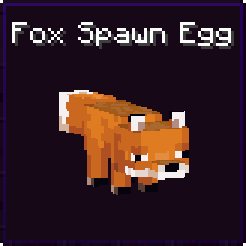
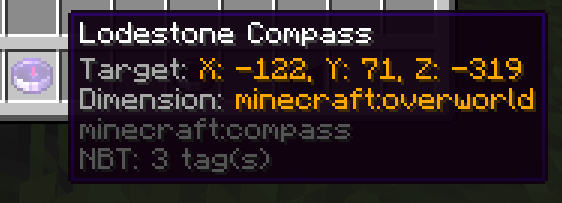
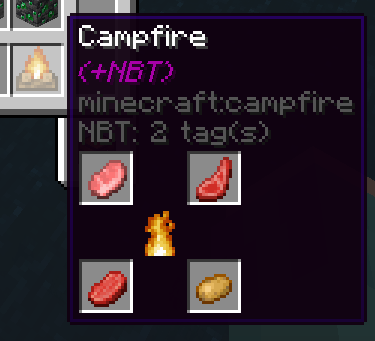
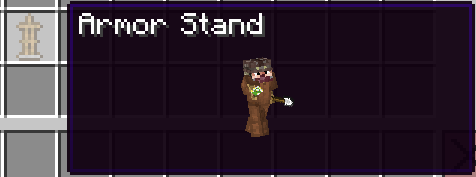
Advanced Tooltips adds configurable item and block tooltips that reveal useful details at a glance. Shulker boxes and other storage items can show their contents, with compact layouts and colored shulker-box displays; tooltips can also reveal loot tables and campfire contents when present. Other examples include maps, lodestone compass coordinates and dimensions, banner patterns, armor, repair costs, signs, jukebox discs, and food hunger and saturation information. Entity-related tooltips cover armor stands, bees and beehives, fish or axolotl buckets, spawn eggs, and mob spawners, with options such as showing names, honey levels, or a spinning entity preview. Potion and other effect tooltips can show effects from potions, tipped arrows, beacons, and food, while hidden effects can remain obscured. Most features can be enabled or disabled and adjusted through the mod's configuration, including display styles and several tooltip details.
Written from Modrinth , CurseForge and the GitHub README . How we write it
What its code does
Advanced Tooltips adds a command and settings file, with its changes focused only on inventory and items, and it never connects to the internet. It adds the `/advancedtooltips` command, creates one settings file, and we checked all 3 files it has published since 2022.
Written from our checks of its files. How we check

At a glance
- Download
- Files up to Minecraft 1.19.2.
- Releases
- Latest release on 9 Aug 2022.
- Statistics
- 13 downloads a day.
- Modpacks
- In 54 modpacks.
Every current file
See each file in ReleasesThe newest release or beta for each Minecraft version and loader, on Modrinth and CurseForge.
MinecraftFabric
PassedDeep check
Have a copy of Advanced Tooltips? Check that it is the official one.
Drop it here. We compare its fingerprint with the official Advanced Tooltips files. If we do not know the file, we upload it for a deep check.
Creators
Who makes Advanced Tooltips, with their most downloaded other projects.
NebelNidasOwner, 9 projects


Source and links
- Source code
- Public on GitHub
- Report a problem
- A public issue tracker on GitHub
- Pages
- On Modrinth , CurseForge and Discord
Something wrong here? Report a mistake
Something wrong here? Report a mistake
Something wrong here? Report a mistake
None found
No sign it sends data.
- Its code
- Contacts no web address.
We find the web addresses its code can contact, but we cannot see everything a mod does while it runs. Wrong result? Tell us
What we checked
A mod can send information about you over the internet, such as your player name or your login.
- Deep checkWe read the code and list each web address it can contact, and what it sends. We leave out code that is never used.
- Its current fileThe newest release or beta for each Minecraft version and loader, on Modrinth and CurseForge.. See each file in Releases
- Web addresses
- None in its code.
- Crash reports and usage dataA crash report or usage data service named in the mod's files. The code does not show what is sent to it, or when.
- None named in its files.
- Author on ModrinthThe form on Modrinth where the author declares crash reports, usage data and advertisements. Since 13 Aug 2026, Modrinth requires it for projects that collect data on their users or show advertisements.
- Nothing declared about crash reports, usage data or advertisements.
Something wrong here? Report a mistake
Something wrong here? Report a mistake
Something wrong here? Report a mistake
Something wrong here? Report a mistake
Something wrong here? Report a mistake
Something wrong here? Report a mistake
Something wrong here? Report a mistake
- Downloads
- 340K+339 in 26 days
Modrinth and CurseForge - Created
- 30 Jul 2022
- Latest release
- 9 Aug 2022
- License
- GNU Lesser General Public License v3.0 only
In-game changes
It has no file for a recent Minecraft version, so this shows its files for Minecraft 1.19 to 1.19.2.
Changes the game's code in 1 area.
- Inventory and itemsChanges 12 game code files in this area, which covers items, chests and other containers, crafting and enchanting.
- Item stacks, placing blocks and 10 more
Also
- New content
- Adds no new blocks, items or other content.
- Vanilla filesFiles with the same name and folder as one of Minecraft's own, which they replace. Tags and language files are merged instead.
- Keeps all of vanilla Minecraft's textures, models and sounds.
Something wrong here? Report a mistake