
OverflowAnimations (Old Animations)
Minecraft mod by Polyfrost (Wyvest and Mixces)
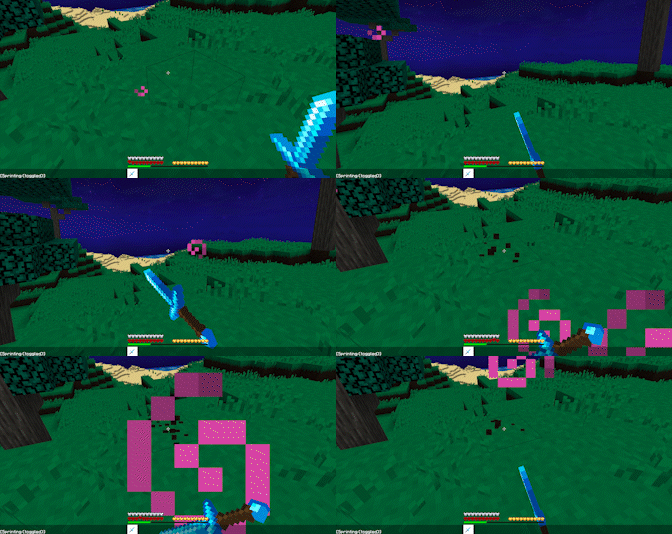
Brings classic and modern item animations back to your game.
How we got this result
- Files checkedWe compare the fingerprint and the content of each file with the malware we and others have found, and look at what is inside it.9 of 9 current filesLast checked on 24 Nov 2026
- Deep checkOur own tools read the code of each current file and look for what harmful code does, like stealing logins or running hidden programs. A person reviews every Malware result.9 of 9 current filesLast checked on 24 Nov 2026
- Passed No harmful code foundOur checks look for known signs of harm. They cannot prove that a file is harmless.
About
From its official pages
Animatium Legacy (OverflowAnimations) restores and combines older Minecraft visuals, especially 1.7 and 1.8 animations, with selected modern styles and fixes. It lets players bring back old eating and drinking, bow and fishing-rod positions, blocking and swinging poses, sneaking, item switching, projectiles, damage effects, and 2D dropped items, alongside modern options such as armor enchantment glint and backwards walking. Players can also adjust item positions, rotation, scale, swing speed, and equip animations, and choose older interface details such as tab lists, tooltips, status-effect placement, camera positions, and loading screens. Additional visual choices cover older clouds, sky and fog, lighting, grass appearance, and menu panoramas, with optional resource packs providing period-style textures. On supported Fabric servers, the mod can enable selected old gameplay behaviors, including using items while mining and the 1.8 sneak height; these server-controlled mechanics do not activate in singleplayer or on servers that do not request them.
Written from Modrinth , CurseForge and the GitHub README . How we write it
At a glance
- Download
- Files up to Minecraft 26.3.
- Releases
- Latest release on 24 Nov 2026.
- Statistics
- 8.9K downloads a day.
- Modpacks
- In 36 modpacks.
Every current file
See each file in ReleasesThe newest release or beta for each Minecraft version and loader, on Modrinth and CurseForge.
MinecraftFabricForgeornithe
26.3overflowanimations-5.1.13+26.3-fabric.jarPassedFile checked on 24 Nov 2026Deep check on 24 Nov 2026No fileNo file
26.2overflowanimations-5.1.13-26.2-fabric.jarPassedFile checked on 24 Nov 2026Deep check on 24 Nov 2026No fileNo file
26.1 to 26.1.2overflowanimations-5.1.13-26.1.2-fabric.jarPassedFile checked on 24 Nov 2026Deep check on 24 Nov 2026No fileNo file
1.21.11overflowanimations-5.1.13+1.21.11-fabric.jarPassedFile checked on 24 Nov 2026Deep check on 24 Nov 2026No fileNo file
1.21.9 to 1.21.10overflowanimations-5.1.13+1.21.10-fabric.jarPassedFile checked on 24 Nov 2026Deep check on 24 Nov 2026No fileNo file
1.21.6 to 1.21.8overflowanimations-5.1.13+1.21.8-fabric.jarPassedFile checked on 24 Nov 2026Deep check on 24 Nov 2026No fileNo file
PassedDeep checkNo file
Have a copy of OverflowAnimations (Old Animations)? Check that it is the official one.
Drop it here. We compare its fingerprint with the official OverflowAnimations (Old Animations) files. If we do not know the file, we upload it for a deep check.
Creators
Who makes OverflowAnimations (Old Animations), with their most downloaded other projects.
 PolyfrostOrganization, 37 projects
 Chatting (Chat Animations + More), Passed
 VanillaHUD (Scoreboard / Hotbar / More), Passed
 PolySprint (Toggle Sprint / Sneak), Passed
 CrashPatch (Crash Preventer), Passed
 Hytils Reborn, Passed
 PolyNametag (Nametags), Passed
 OneConfig, Passed
 EvergreenHUD (FPS / CPS / Keystrokes HUD), Passed
 PolyPatcher, Passed
 Poly+ (PolyPlus), Passed
 OverflowParticles (Particles Mod), Passed
 PolyBlur (Motion Blur), Passed
 PolyHitbox (Custom Hitboxes), Passed
 DamageTint (HitColor), Passed
 PolyCompose, Passed
 PolyTime (Time Changer), Passed
 BehindYou (SnapLook), Passed
 PolyWeather (Weather Changer), Passed
 PolyCrosshair (Custom Crosshairs), Passed
 ColorSaturation (Color Boost), Passed
 Canelex Keystrokes Revamp, Passed
 ChatTweaks (Compact Chat + More), Passed
 Redaction, Passed
 SoundTweaks, Passed
 WyvestOwner, 38 projectsChatting (Chat Animations + More), PassedVanillaHUD (Scoreboard / Hotbar / More), PassedPolySprint (Toggle Sprint / Sneak), PassedCrashPatch (Crash Preventer), PassedHytils Reborn, PassedPolyNametag (Nametags), PassedOneConfig, PassedEvergreenHUD (FPS / CPS / Keystrokes HUD), PassedPolyPatcher, PassedPoly+ (PolyPlus), PassedOverflowParticles (Particles Mod), PassedPolyBlur (Motion Blur), PassedPolyHitbox (Custom Hitboxes), PassedDamageTint (HitColor), PassedPolyCompose, PassedPolyTime (Time Changer), PassedBehindYou (SnapLook), PassedPolyWeather (Weather Changer), Passed
 Better Night Vision, PassedPolyCrosshair (Custom Crosshairs), PassedColorSaturation (Color Boost), PassedCanelex Keystrokes Revamp, PassedChatTweaks (Compact Chat + More), PassedRedaction, Passed
 MixcesMember, 3 projects


Source and links
- Source code
- Public on GitHub
- Report a problem
- A public issue tracker on GitHub
- Pages
- On Modrinth , CurseForge and Discord
Something wrong here? Report a mistake
Something wrong here? Report a mistake
Something wrong here? Report a mistake
None found
No sign it sends data.
- Its code
- Contacts no web address.
We find the web addresses its code can contact, but we cannot see everything a mod does while it runs. Wrong result? Tell us
What we checked
A mod can send information about you over the internet, such as your player name or your login.
- Deep checkWe read the code and list each web address it can contact, and what it sends. We leave out code that is never used.
- Its recent filesIts current files for a recent Minecraft version, or first published in the last 2 years. Recent versions: those released in the last 2 years, plus 1.20.1 and 1.21.1, among the most played in modpacks., not its 1 older file. See each file in Releases
- Web addresses
- None in its code.
- Crash reports and usage dataA crash report or usage data service named in the mod's files. The code does not show what is sent to it, or when.
- None named in its files.
- Author on ModrinthThe form on Modrinth where the author declares crash reports, usage data and advertisements. Since 13 Aug 2026, Modrinth requires it for projects that collect data on their users or show advertisements.
- Nothing declared about crash reports, usage data or advertisements.
Something wrong here? Report a mistake
Something wrong here? Report a mistake
Something wrong here? Report a mistake
Something wrong here? Report a mistake
Something wrong here? Report a mistake
Something wrong here? Report a mistake
Something wrong here? Report a mistake
- Downloads
- 1.7M+232K in 26 days
Modrinth and CurseForge - Created
- 16 Nov 2022
- Latest release
- 24 Nov 2026
In-game changes
Changes the game's code in 10 areas.
- Rendering and graphicsChanges 48 game code files in this area, which covers drawing mobs, items, particles and textures on screen.
- The code that draws each frame, how living creatures are drawn and 46 more
- User interfaceChanges 17 game code files in this area, which covers menus, screens, tooltips, the chat window and the in-game overlay.
- The in-game overlay, the inventory screen and 14 more
- Mobs and their behaviorChanges 9 game code files in this area, which covers mobs, animals, villagers, projectiles and how they move and act.
- Living creatures in general, entities in general and 7 more
- PlayerChanges 5 game code files in this area, which covers your character: movement, abilities, hunger and controls.
- The player, your own player and 3 more
- World renderingChanges 6 game code files in this area, which covers drawing the terrain, sky, clouds and weather.
- The world renderer, light and brightness on screen and 4 more
- Inventory and itemsChanges 3 game code files in this area, which covers items, chests and other containers, crafting and enchanting.
- Item stacks, items in general and the player's inventory
- Networking and multiplayerChanges 2 game code files in this area, which covers connections, the server list and what is sent between your game and a server.
- What the game does with messages from the server and custom messages from the server
- Server and world logicChanges 2 game code files in this area, which covers the world, commands, scoreboards, saved data and game rules.
- The world in your game and the settings of the world in your game
- World generationChanges 1 game code file in this area, which covers terrain, biomes and structures made when new land is created.
- 1 game code file
- Game coreChanges 1 game code file in this area, which covers the main loop, lighting and other code the whole game uses.
- The code that starts and runs the game
Also
- Vanilla filesFiles with the same name and folder as one of Minecraft's own, which they replace. Tags and language files are merged instead.
- Keeps all of vanilla Minecraft's textures, models and sounds.
Something wrong here? Report a mistake