
How we got this result
- Files checkedWe compare the fingerprint and the content of each file with the malware we and others have found, and look at what is inside it.59 of 59 current filesLast checked on 16 Oct 2026
- Deep checkOur own tools read the code of each current file and look for what harmful code does, like stealing logins or running hidden programs. A person reviews every Malware result.59 of 59 current filesLast checked on 21 Oct 2026
- Passed No harmful code foundOur checks look for known signs of harm. They cannot prove that a file is harmless.
About
From its official pages
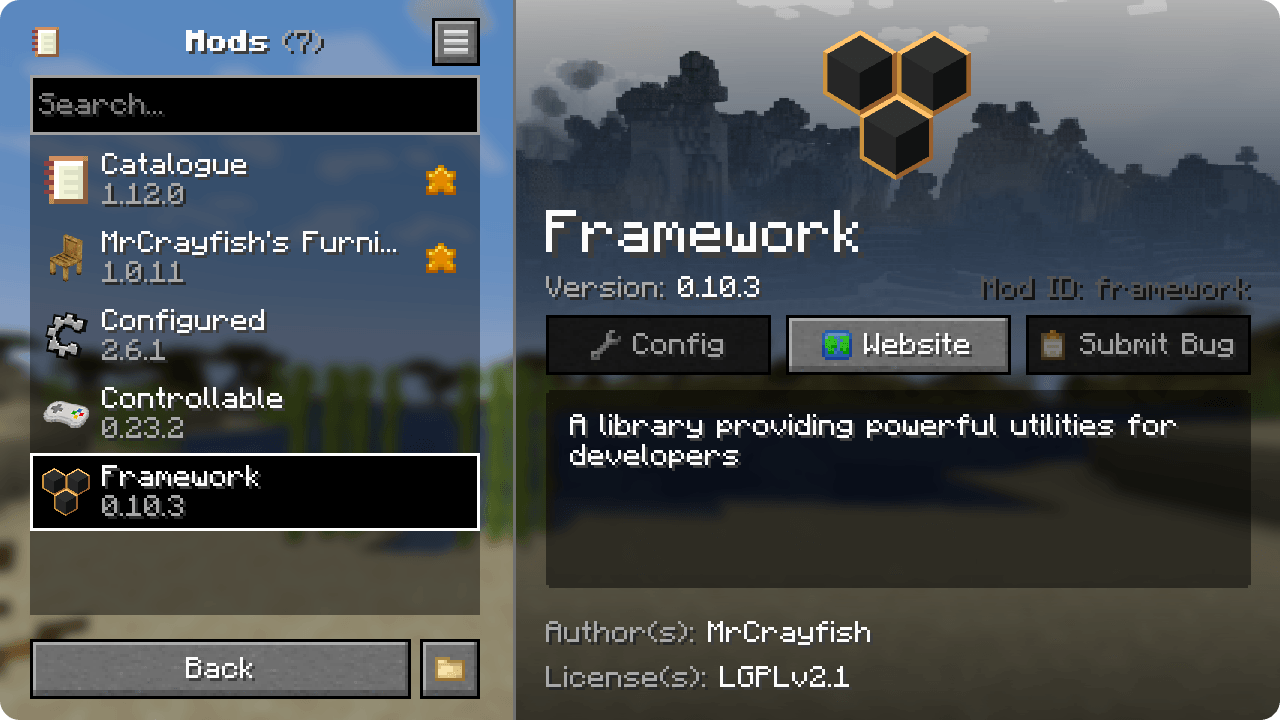
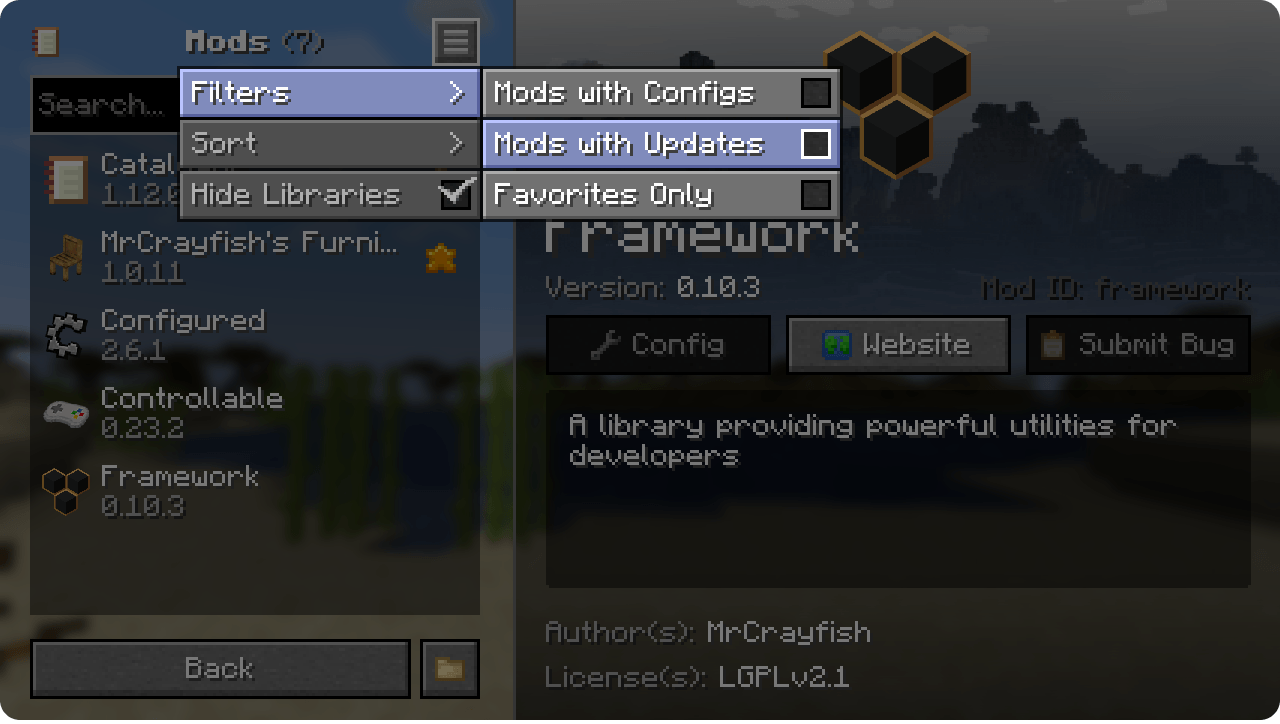
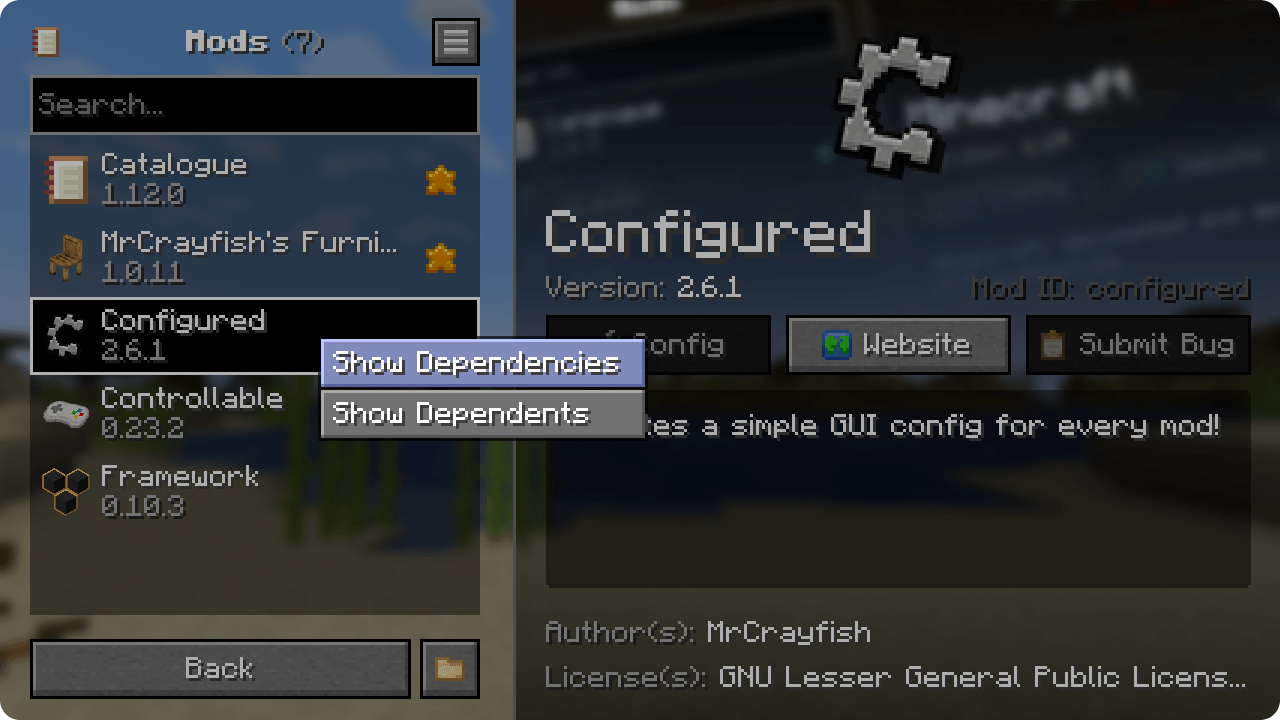
Catalogue provides an in-game menu for viewing and managing installed mods across modloaders. Players can search and filter the list, sort or favourite mods for quicker access, and inspect a mod’s dependencies and dependents from its context menu. The menu can hide loader- and mod-added libraries and offers shortcuts to a mod’s configuration, homepage, and issue tracker. Mod entries can display Forge or NeoForge logos, Fabric icons, or an item from the mod as a fallback. Mod developers can customize how their entries appear with an icon, banner, and background; the background fades into the description area.
Written from CurseForge and the GitHub README . How we write it
What its code does
Catalogue creates two settings files and does not connect to the internet. We checked all 92 files it has published since 2021.
Written from our checks of its files. How we check

At a glance
- Download
- Files up to Minecraft 26.2.
- Releases
- Latest release on 10 Jul 2026.
- Statistics
- 29K downloads a day.
- Modpacks
- In 5,692 modpacks.
Every current file
See each file in ReleasesThe newest release or beta for each Minecraft version and loader, on CurseForge.
MinecraftFabricNeoForgeForge
26.2catalogue-fabric-26.2-1.12.3.jarPassedFile checked on 15 Oct 2026Deep check on 17 Oct 2026catalogue-neoforge-26.2-1.12.3.jarPassedFile checked on 15 Oct 2026Deep check on 17 Oct 2026No file
26.1.2catalogue-fabric-26.1.2-1.12.3.jarPassedFile checked on 15 Oct 2026Deep check on 17 Oct 2026catalogue-neoforge-26.1.2-1.12.3.jarPassedFile checked on 15 Oct 2026Deep check on 17 Oct 2026No file
26.1.1catalogue-fabric-26.1.1-1.12.3.jarPassedFile checked on 15 Oct 2026Deep check on 21 Oct 2026catalogue-neoforge-26.1.1-1.12.3.jarPassedFile checked on 15 Oct 2026Deep check on 21 Oct 2026No file
26.1catalogue-fabric-26.1-1.12.3.jarPassedFile checked on 15 Oct 2026Deep check on 21 Oct 2026catalogue-neoforge-26.1-1.12.3.jarPassedFile checked on 15 Oct 2026Deep check on 21 Oct 2026No file
1.21.11catalogue-fabric-1.21.11-1.12.3.jarPassedFile checked on 15 Oct 2026Deep check on 17 Oct 2026catalogue-neoforge-1.21.11-1.12.3.jarPassedFile checked on 15 Oct 2026Deep check on 17 Oct 2026catalogue-forge-1.21.11-1.12.3.jarPassedFile checked on 15 Oct 2026Deep check on 17 Oct 2026
1.21.10catalogue-fabric-1.21.10-1.12.3.jarPassedFile checked on 15 Oct 2026Deep check on 21 Oct 2026catalogue-neoforge-1.21.10-1.12.3.jarPassedFile checked on 15 Oct 2026Deep check on 21 Oct 2026catalogue-forge-1.21.10-1.12.3.jarPassedFile checked on 15 Oct 2026Deep check on 21 Oct 2026
1.21.9catalogue-fabric-1.21.9-1.12.3.jarPassedFile checked on 15 Oct 2026Deep check on 21 Oct 2026catalogue-neoforge-1.21.9-1.12.3.jarPassedFile checked on 15 Oct 2026Deep check on 21 Oct 2026catalogue-forge-1.21.9-1.12.3.jarPassedFile checked on 15 Oct 2026Deep check on 21 Oct 2026
1.21.8catalogue-fabric-1.21.8-1.12.2.jarPassedFile checked on 15 Oct 2026Deep check on 21 Oct 2026catalogue-neoforge-1.21.8-1.12.2.jarPassedFile checked on 15 Oct 2026Deep check on 21 Oct 2026catalogue-forge-1.21.8-1.12.2.jarPassedFile checked on 15 Oct 2026Deep check on 21 Oct 2026
1.21.7catalogue-fabric-1.21.7-1.12.1.jarPassedFile checked on 15 Oct 2026Deep check on 21 Oct 2026catalogue-neoforge-1.21.7-1.12.1.jarPassedFile checked on 15 Oct 2026Deep check on 21 Oct 2026catalogue-forge-1.21.7-1.12.1.jarPassedFile checked on 15 Oct 2026Deep check on 21 Oct 2026
1.21.6catalogue-fabric-1.21.6-1.12.1.jarPassedFile checked on 16 Oct 2026Deep check on 21 Oct 2026catalogue-neoforge-1.21.6-1.12.1.jarPassedFile checked on 15 Oct 2026Deep check on 21 Oct 2026catalogue-forge-1.21.6-1.12.1.jarPassedFile checked on 16 Oct 2026Deep check on 21 Oct 2026
1.21.5catalogue-fabric-1.21.5-1.12.1.jarPassedFile checked on 16 Oct 2026Deep check on 21 Oct 2026catalogue-neoforge-1.21.5-1.12.1.jarPassedFile checked on 16 Oct 2026Deep check on 21 Oct 2026catalogue-forge-1.21.5-1.12.1.jarPassedFile checked on 16 Oct 2026Deep check on 21 Oct 2026
1.21.4catalogue-fabric-1.21.4-1.12.1.jarPassedFile checked on 16 Oct 2026Deep check on 21 Oct 2026catalogue-neoforge-1.21.4-1.12.1.jarPassedFile checked on 16 Oct 2026Deep check on 21 Oct 2026catalogue-forge-1.21.4-1.12.1.jarPassedFile checked on 16 Oct 2026Deep check on 21 Oct 2026
1.21.3catalogue-fabric-1.21.3-1.11.0.jarPassedFile checked on 16 Oct 2026Deep check on 21 Oct 2026catalogue-neoforge-1.21.3-1.11.0.jarPassedFile checked on 16 Oct 2026Deep check on 21 Oct 2026catalogue-forge-1.21.3-1.11.0.jarPassedFile checked on 16 Oct 2026Deep check on 21 Oct 2026
1.21.1catalogue-fabric-1.21.1-1.11.2.jarPassedFile checked on 15 Oct 2026Deep check on 21 Oct 2026catalogue-neoforge-1.21.1-1.11.2.jarPassedFile checked on 15 Oct 2026Deep check on 21 Oct 2026catalogue-forge-1.21.1-1.11.2.jarPassedFile checked on 15 Oct 2026Deep check on 21 Oct 2026
1.21catalogue-fabric-1.21-1.10.2.jarPassedFile checked on 16 Oct 2026Deep check on 21 Oct 2026catalogue-neoforge-1.21-1.10.2.jarPassedFile checked on 16 Oct 2026Deep check on 21 Oct 2026catalogue-forge-1.21-1.10.2.jarPassedFile checked on 16 Oct 2026Deep check on 21 Oct 2026
1.20.6catalogue-fabric-1.20.6-1.10.1.jarPassedFile checked on 16 Oct 2026Deep check on 17 Oct 2026catalogue-neoforge-1.20.6-1.10.1.jarPassedFile checked on 16 Oct 2026Deep check on 17 Oct 2026catalogue-forge-1.20.6-1.10.1.jarPassedFile checked on 16 Oct 2026Deep check on 17 Oct 2026
1.20.5catalogue-fabric-1.20.5-1.10.0.jarPassedFile checked on 16 Oct 2026Deep check on 21 Oct 2026catalogue-neoforge-1.20.5-1.10.0.jarPassedFile checked on 16 Oct 2026Deep check on 21 Oct 2026No file
1.20.4catalogue-fabric-1.20.4-1.9.1.jarPassedFile checked on 16 Oct 2026Deep check on 21 Oct 2026catalogue-neoforge-1.20.4-1.9.1.jarPassedFile checked on 16 Oct 2026Deep check on 21 Oct 2026catalogue-forge-1.20.4-1.9.1.jarPassedFile checked on 16 Oct 2026Deep check on 21 Oct 2026
1.20.1No fileNo filecatalogue-forge-1.20.1-1.8.0.jarPassedFile checked on 16 Oct 2026Deep check on 21 Oct 2026
1.19.4No fileNo filecatalogue-forge-1.19.4-1.7.0.jarPassedFile checked on 16 Oct 2026Deep check on 17 Oct 2026
1.19.3No fileNo filecatalogue-1.7.0-1.19.3.jarPassedFile checked on 16 Oct 2026Deep check on 21 Oct 2026
1.19.2No fileNo filecatalogue-1.7.0-1.19.2.jarPassedFile checked on 16 Oct 2026Deep check on 21 Oct 2026
1.19 to 1.19.1No fileNo filecatalogue-1.6.3-1.19.jarPassedFile checked on 16 Oct 2026Deep check on 21 Oct 2026
1.18.1 to 1.18.2No fileNo filecatalogue-1.6.2-1.18.2.jarPassedFile checked on 16 Oct 2026Deep check on 17 Oct 2026
1.18No fileNo filecatalogue-1.6.0-1.18.jarPassedFile checked on 16 Oct 2026Deep check on 21 Oct 2026
1.17.1No fileNo filecatalogue-1.5.0-1.17.1.jarPassedFile checked on 16 Oct 2026Deep check on 17 Oct 2026
1.16.5No fileNo filecatalogue-1.6.1-1.16.5.jarPassedFile checked on 16 Oct 2026Deep check on 17 Oct 2026
1.16.3 to 1.16.4No fileNo filecatalogue-1.3.0-1.16.5.jarPassedFile checked on 16 Oct 2026Deep check on 21 Oct 2026
PassedDeep checkNo file
Have a copy of Catalogue? Check that it is the official one.
Drop it here. We compare its fingerprint with the official Catalogue files. If we do not know the file, we upload it for a deep check.
Creators
Who makes Catalogue, with their most downloaded other projects.
- MrCrayfishAuthor, 35 projects
 Framework, Passed
 Configured, Passed
 MrCrayfish's Furniture Mod (Legacy), Passed
 Goblin Traders, Passed
 MrCrayfish's Furniture Mod: Refurbished, Passed
 Obfuscate, Passed
 Backpacked, Passed
 MrCrayfish's Gun Mod, Passed
 Controllable, Passed
 MrCrayfish's Vehicle Mod, Passed
 Golden Hopper, Passed
 Goblin Traders [Fabric], Passed
 Framework (Fabric), Passed
 Mighty Mail, Passed
 Configured (Fabric), Passed
 MrCrayfish's More Furniture Mod, Passed
 Glasscutter, Passed
 Catalogue (Fabric), Passed
 Mighty Mail (Fabric), Passed
 Menulogue, Passed
 Controllable (Fabric) [Archived], Passed
 Backpacker, Passed
 Backpacked (Fabric), Passed
 MrCrayfish's Device Mod, Passed
Source and links
- Pages
- On CurseForge
Something wrong here? Report a mistake
Something wrong here? Report a mistake
Something wrong here? Report a mistake
None found
No sign it sends data.
- Its code
- Contacts no web address.
We find the web addresses its code can contact, but we cannot see everything a mod does while it runs. Wrong result? Tell us
What we checked
A mod can send information about you over the internet, such as your player name or your login.
- Deep checkWe read the code and list each web address it can contact, and what it sends. We leave out code that is never used.
- Its recent filesIts current files for a recent Minecraft version, or first published in the last 2 years. Recent versions: those released in the last 2 years, plus 1.20.1 and 1.21.1, among the most played in modpacks., not its 23 older files. See each file in Releases
- Web addresses
- None in its code.
- Crash reports and usage dataA crash report or usage data service named in the mod's files. The code does not show what is sent to it, or when.
- None named in its files.
Something wrong here? Report a mistake
Something wrong here? Report a mistake
Something wrong here? Report a mistake
Something wrong here? Report a mistake
Something wrong here? Report a mistake
Something wrong here? Report a mistake
Something wrong here? Report a mistake
- Downloads
- 47.4M+879K in 30 days
On CurseForge - Created
- 2 Apr 2021
- Latest release
- 10 Jul 2026
- License
- MIT License
In-game changes
Does not change the game's code directly.
Also
- New content
- Adds no new blocks, items or other content.
- Vanilla filesFiles with the same name and folder as one of Minecraft's own, which they replace. Tags and language files are merged instead.
- Keeps all of vanilla Minecraft's textures, models and sounds.
Something wrong here? Report a mistake