WI Freecam
Minecraft mod by alexander9892
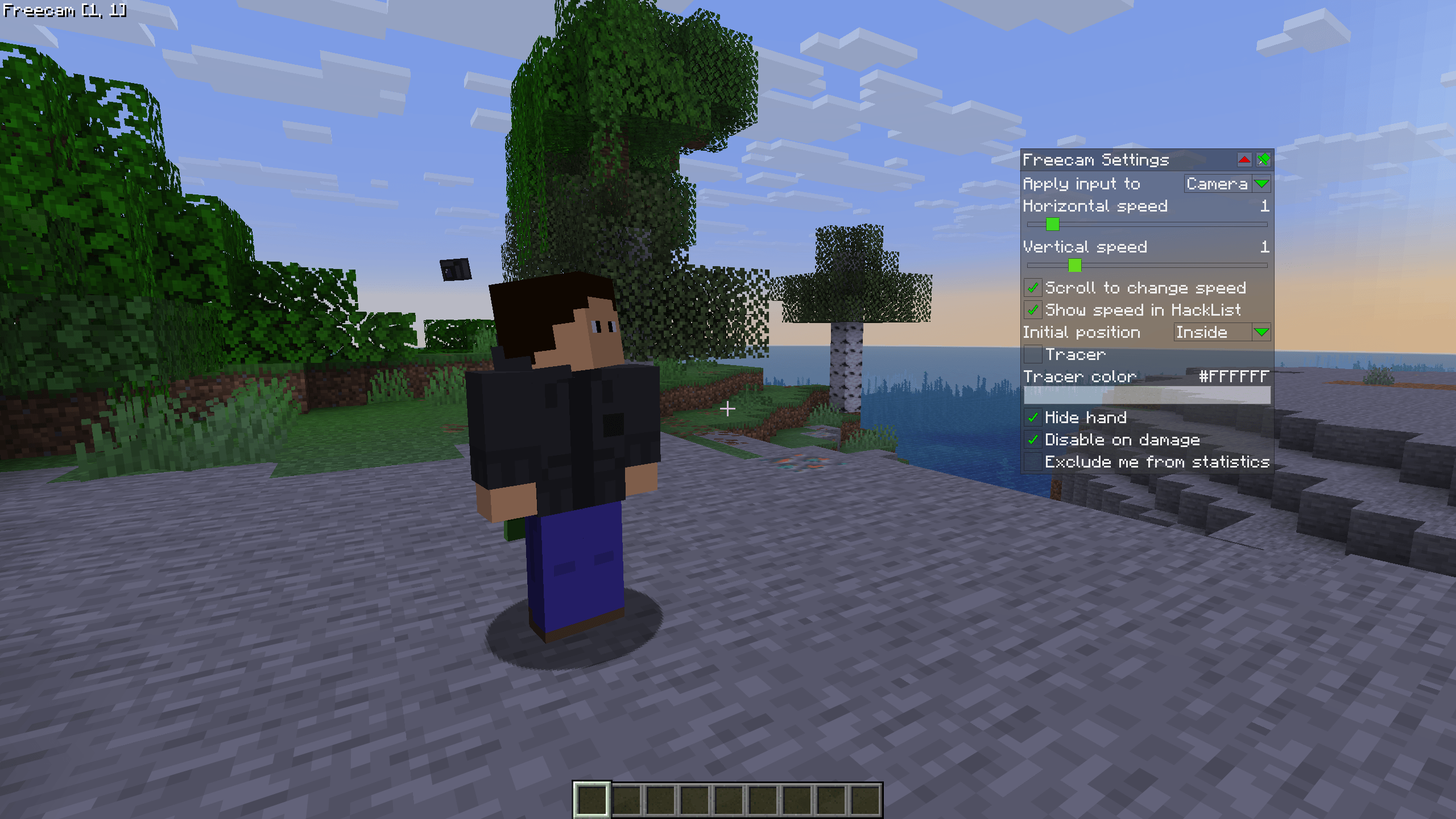
Allows you to move the camera without moving your character. As seen in Wurst.
How we got this result
- Files checkedWe compare the fingerprint and the content of each file with the malware we and others have found, and look at what is inside it.8 of 8 current filesLast checked on 28 Oct 2026
- Deep checkOur own tools read the code of each current file and look for what harmful code does, like stealing logins or running hidden programs. A person reviews every Malware result.8 of 8 current filesLast checked on 28 Oct 2026
- Passed No harmful code foundOur checks look for known signs of harm. They cannot prove that a file is harmless.
About
From its official pages
WI Freecam lets you detach and move the camera while your character stays in place, providing a free-view and screenshot tool without changing the character’s position. The camera moves independently without a fake entity or frozen movement packets, while the player retains full physics; you can also switch between camera and character control on the fly. Movement controls separate horizontal travel from vertical movement, stop immediately when input is released, and offer adjustable horizontal and vertical speeds linked by a preferred ratio. Optional scroll speed adjustment and an on-screen speed indicator help with positioning, while precise numeric entry on sliders supports fine-tuning. You can choose the camera’s starting position inside, in front of, or on top of your character, add a tracer line to find them, hide the hand for cleaner screenshots, or disable Freecam when damaged.
Written from CurseForge and the GitHub README . How we write it
At a glance
- Download
- Files up to Minecraft 26.3.
- Releases
- Latest release on 24 Nov 2026.
- Statistics
- 92 downloads a day.
- Modpacks
- In 15 modpacks.
Every current file
See each file in ReleasesThe newest release or beta for each Minecraft version and loader, on CurseForge.
MinecraftFabric
PassedDeep check
Have a copy of WI Freecam? Check that it is the official one.
Drop it here. We compare its fingerprint with the official WI Freecam files. If we do not know the file, we upload it for a deep check.
Creators
Who makes WI Freecam, with their most downloaded other projects.
- alexander9892Author, 6 projects


Source and links
- Source code
- Public on GitHub
- Pages
- On CurseForge
Something wrong here? Report a mistake
Something wrong here? Report a mistake
Something wrong here? Report a mistake
Sends data
It sends system details and usage data.
- Sent to
- An address built while the game runs.
- Found in
- Its code.
We find the web addresses its code can contact, but we cannot see everything a mod does while it runs. Wrong result? Tell us
What we checked
A mod can send information about you over the internet, such as your player name or your login.
- Deep checkWe read the code and list each web address it can contact, and what it sends. We leave out code that is never used.
- Its current filesThe newest release or beta for each Minecraft version and loader, on CurseForge.. See each file in Releases
- Web address
- Address built while the game runsThe code builds this address while the game runs, so it is not written in the file.: Sends usage statistics.
- Crash reports and usage dataA crash report or usage data service named in the mod's files. The code does not show what is sent to it, or when.
- None named in its files.
Something wrong here? Report a mistake
Something wrong here? Report a mistake
Something wrong here? Report a mistake
Something wrong here? Report a mistake
Something wrong here? Report a mistake
Something wrong here? Report a mistake
- Downloads
- 23K+2.8K in 30 days
On CurseForge - Created
- 6 Feb 2026
- Latest release
- 24 Nov 2026
- License
- GNU General Public License version 3 (GPLv3)
In-game changes
Changes the game's code in 5 areas.
- Game optionsChanges 4 game code files in this area, which covers settings, key bindings and the option screens.
- Mouse input, key bindings and 1 more
- Rendering and graphicsChanges 4 game code files in this area, which covers drawing mobs, items, particles and textures on screen.
- The code that draws each frame, the camera and 2 more
- User interfaceChanges 3 game code files in this area, which covers menus, screens, tooltips, the chat window and the in-game overlay.
- The in-game overlay and the language list
- World renderingChanges 2 game code files in this area, which covers drawing the terrain, sky, clouds and weather.
- The world renderer and 1 more
- PlayerChanges 1 game code file in this area, which covers your character: movement, abilities, hunger and controls.
- Your own player
Also
- Vanilla filesFiles with the same name and folder as one of Minecraft's own, which they replace. Tags and language files are merged instead.
- Keeps all of vanilla Minecraft's textures, models and sounds.
Something wrong here? Report a mistake